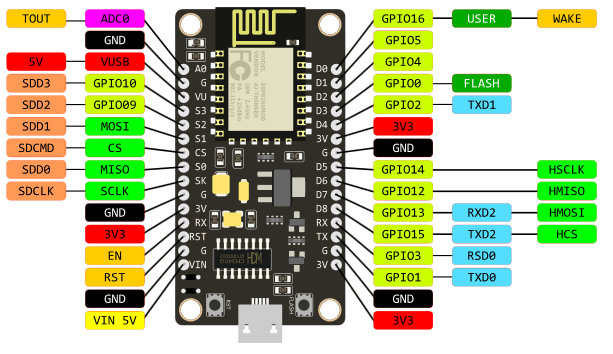
僅有LCD背光亮起,但無法正常顯示內容,查詢後可能是電壓的問題(NODE MCU
,找到一個不需要另外拉線可以使用5V供電的方法。
手上的nodeMCU 為 v3 LoLin (不同版本的NodeMCU腳位可能略有不同)

找了很多資料都需要額外電路,最後發現,其實左邊第三隻腳VV,
就是輸出USB供給的電壓(5V),實際量起來大約4.98V,足夠囉。
EditText it is always enabled, regardless of the value of the attribute.true" or "false".@Override protected void onCreate(Bundle savedInstanceState) { super.onCreate(savedInstanceState); setContentView(R.layout.activity_main); final TextView textView=(TextView)findViewById(R.id.txt); Button button=(Button)findViewById(R.id.add); button.setOnClickListener(new View.OnClickListener() { @Override public void onClick(View v) { int num=0; if (!textView.getText().toString().equals("")) { num=Integer.parseInt(textView.getText().toString()); } num++; textView.setText(String.valueOf(num)); } }); }


<?xml version="1.0" encoding="utf-8"?>
<RelativeLayout xmlns:android="http://schemas.android.com/apk/res/android"
    xmlns:tools="http://schemas.android.com/tools"
    android:layout_width="match_parent"
    android:layout_height="match_parent"
    android:paddingBottom="@dimen/activity_vertical_margin"
    android:paddingLeft="@dimen/activity_horizontal_margin"
    android:paddingRight="@dimen/activity_horizontal_margin"
    android:paddingTop="@dimen/activity_vertical_margin"
    tools:context="com.example.boywhychen.context_menu.MainActivity">


    <TextView
        android:layout_width="wrap_content"
        android:layout_height="wrap_content"
        android:id="@+id/txt"
        android:freezesText="true"
        />

    <Button
        android:layout_width="wrap_content"
        android:layout_height="wrap_content"
        android:id="@+id/add"
        android:text="Add"
        android:layout_below="@+id/txt"
        />
</RelativeLayout>


String formatStr="%d + %d = %d";
TextView textView=(TextView)findViewById(R.id.txt);
String text=String.format(formatStr,1,10,11); textView.setText(text);
String formatStr="%1$d + %3$d = %2$d";
TextView textView=(TextView)findViewById(R.id.txt);
String text=String.format(formatStr,1,11,10);
textView.setText(text);

